One rig, a target with known 3D points (classic calibration)
You have: cameras fixed in place, and one image per camera of a target whose dots have known 3D positions (a plate that was
placed in the volume, or moved by known steps and listed in one file).
You want: the camera files (.ori and .addpar) for each camera.
Time: 20 minutes. Tested: the check and the dry run below run in CI on test_data/test_cavity. Writing the files is not
tested, because it changes the folder.
If your plate is held by hand at unknown positions, use two rigs, hand-held plate instead. Course page 3 explains what the camera files contain.
1. What you need
- One image per camera:
cal/cam1.tif...cal/camN.tif. - The 3D target file
cal/target_on_a_side.txt: one line per dot,id x y z(mm). - For each camera, a first guess
cal/camN.tif.oriandcal/camN.tif.addpar, and the dots found in the image:cal/camN.tif_targets. The first guess may be rough, but it must be close enough to match dots to the target. - The parameter file, with the right image size, pixel size and the three indices (air 1.0, glass, water; a common mistake is to swap the last two).
2. Check what is there
ready_headless=True means the folder has everything the command line needs. If problems is not 0, the file
inspect.json lists what is missing. Fix that first.
3. Try the calibration without writing anything
Success! Calibration report written to: calib.json
  cam1: matched 45/73  RMS=3.195px  flags=cc+xh+yh+k1+k2+k3+p1+p2
  cam2: matched 45/73  RMS=3.2763px  flags=cc+xh+yh+k1+k2+k3+p1+p2+interf
  cam3: matched 73/73  RMS=1.2055px  flags=cc+xh+yh+k1+k2+k3+p1+p2+interf
  cam4: matched 72/73  RMS=1.0628px  flags=cc+xh+yh+k1+k2+k3+p1+p2+interf
cross-camera RCM (42 pts in all 4 cams, 73 in >=2): p50=0.057mm p95=0.287mm max=0.665mm
WARNING: cross-camera RCM high relative to per-camera RMS; consider a tracer self-calibration / dumbbell pass (see roadmap).
  mean RMS (4/4 cameras): 2.185px  (dry-run)
Without --dry-run the same command writes the camera files and keeps the old ones as *.autobck.
4. What you should see
Per camera: matched (how many of the 73 target dots were found and used) and RMS (the miss in pixels when the model
projects the dots back into the image). The command also draws an overlay for each camera in cal_run/cal/auto_calib/:
green circles are the dots found in the image, red points are where the model puts them. The red points should sit inside the green circles.
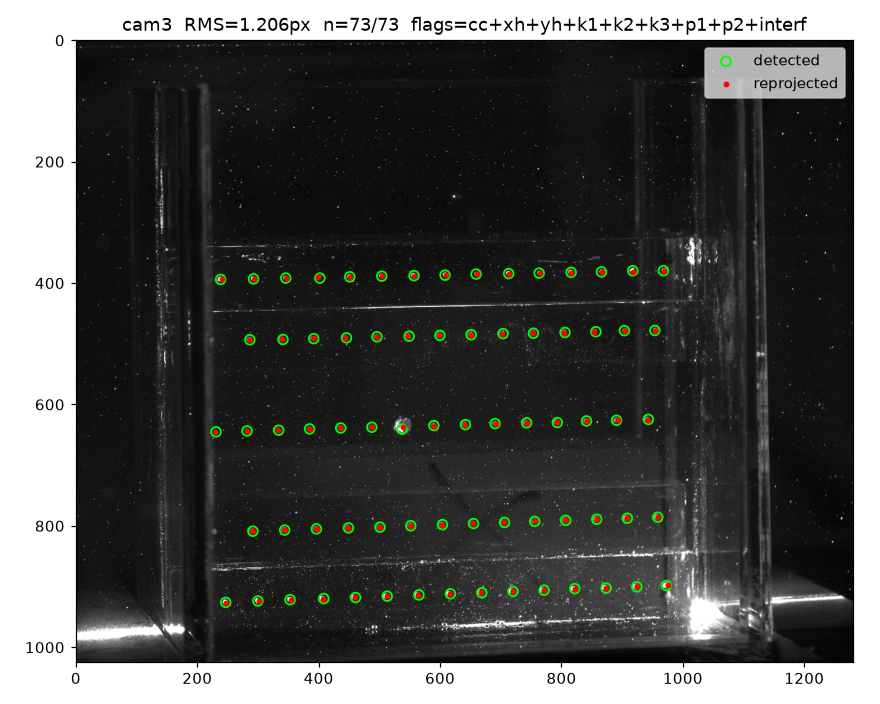
Camera 3, RMS 1.2 px. All dots matched.
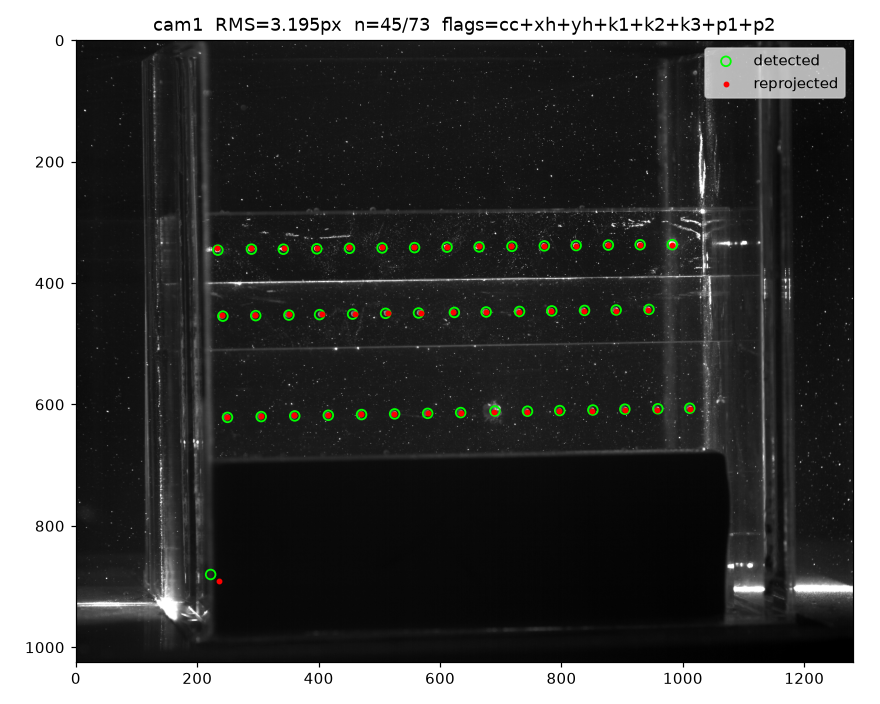
Camera 1, RMS 3.2 px, 45 of 73 dots. This camera is the weak one here.
5. How good is good enough
| Number | Good | Look again |
|---|---|---|
| RMS per camera | below 2 px (the tool's own rule); the lower the better | above 2 px |
| matched | nearly all dots (here 73 of 73) | much fewer, as in cameras 1 and 2 here (45 of 73) |
| cross-camera RCM | small compared with the size of one pixel in the volume (here 1 px is about 0.095 mm) | the tool prints a WARNING when it is high relative to the RMS (here p95 = 0.29 mm) |
The RCM is the distance between the rays of different cameras that should meet at one dot. It sees what the RMS of one camera cannot: cameras that each fit their own image, but disagree with each other. If the WARNING appears, calibrate again, or refine with the particles (page 8, dumbbell). This bundled calibration is good enough for the course. It is an honest example, and not a model of a perfect one.
6. If the first guess is missing: the four-point seed
Without a first guess, the program needs four well-separated target dots per camera, with their ids and pixel positions. Clicking them is the only step that needs a screen:
A window opens for each camera. Click the highlighted points in the order shown. render makes reference images to help, and seed
--seed-json takes the four points from a file when no screen is available. Then run section 3 again. In the graphical interface the
same step is Calibration → Create calibration.
7. Refine with the particles (optional)
When you have tracked a run, the particles themselves can refine the calibration:
Track again afterwards. The new cameras must be checked like any other (page 8).
If it did not work
| You see | Cause | What to do |
|---|---|---|
problems is not 0 |
a file is missing | read inspect.json |
| few dots matched | first guess too far off | make a new first guess (section 6) |
| RMS high for all cameras | indices swapped, or wrong pixel size | check mmp_n2 and mmp_n3 and pix_x in the YAML |
| red points sit off the circles in one pattern | the model is missing a term, or a wrong index | the flags show which terms were fitted; check the indices |
Next
Dumbbell: check or fix the scale, Is the calibration good?, Calibration tutorial (all options).