8. Is the calibration good?
Time: 15 minutes. You need: the my_run folder with the results of pages 4 to 6, and the repository folder.
What this step does
Page 3 gave you two quick checks of the camera files. This page checks the calibration on the real particles of your run. It is the check that finds the most common hidden problem: the cameras disagree a little with each other.
Why the usual number is not enough
The usual number is the reprojection error: project a known point into one image and measure the miss in pixels. It looks at one camera at a time. Four cameras can each have a small reprojection error and still disagree about where a particle is.
The disagreement shows up in a simple way. Take a particle seen by four cameras. Compute its position from all four cameras. Then compute it again from three cameras (leave one out). If the cameras agree, the two positions are the same. If not, the position jumps when the set of cameras changes. A track that is seen by 4 cameras in one frame and by 3 in the next frame gets a false step of that size.
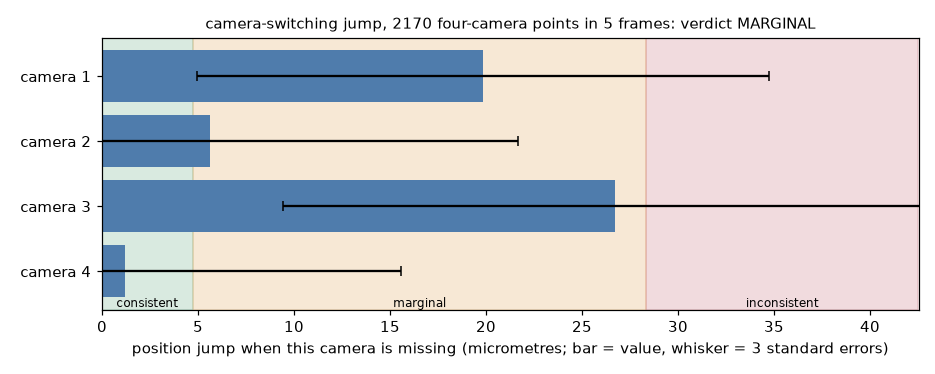
Example from the larger run on this page. The bar is the jump when one camera is missing. The whisker is 3 standard errors: if it does not touch 0, the jump is real and not noise. The colours show the verdict.
Do it
First, the small example. Run the check on the folder my_run (five frames, from page 6):
The small example has too few points to judge:
That is a correct answer. The check needs about 300 points seen by four cameras. A check that says "I cannot tell" is better than one that always says "fine".
Now the larger example, test_data/test_cavity. It is the same experiment with full images. Copy it, process five frames
(this takes a few seconds), and check:
What you should see
calibration consistency: MARGINAL  (2170 four-camera points in 5 frames, 1 px = 95 um; 12 % left out as wrong matches)
  camera   residual median/p90 (px)   smooth field (px)   field reproducible   jump when missing (um): systematic +- s.e. / rms
       1      0.753 / 1.879             0.300                4 %       19.9 +- 5.0 / 217.4
       2      0.733 / 1.758             0.254                0 %        5.6 +- 5.3 / 233.7
       3      0.618 / 1.639             0.234                0 %       26.7 +- 5.8 / 251.7
       4      0.651 / 1.619             0.158                0 %        1.2 +- 4.8 / 209.5
  worst systematic jump 0.28 px footprint -> small systematic offsets between camera subsets; align_partial_points() can remove them, or re-calibrate
The command returns exit code 0 when the verdict is consistent, or when it cannot judge ("too few points"), and 1 for marginal and inconsistent, so a script can use it as a gate.
How to read it
- First line: the verdict, how many points it used, how big one pixel is in the volume (here 95 micrometres), and the share of points it left out because their cameras disagree wildly (wrong matches, called ghosts).
- Residual median / p90: how far the blob in each image is from the projection of the 4-camera 3D point, in pixels. Half of the points are closer than the first number, nine tenths are closer than the second.
- Smooth field (px): the part of the residual that changes slowly across the image, like a small warp. A random error does not do that, a calibration error does.
- Field reproducible: the share of that smooth field that is real. The program fits the field on the odd frames and tests it on the even frames. Near 0 % means the field is noise; a high share means a real, repeatable error. With five frames the number is small and uncertain.
- Jump when missing: the table's main column. The systematic part is the average jump. The
+-is its standard error. The last number is the random scatter of single points (the noise of one point). - Last line: the biggest systematic jump, measured in "pixel footprints" (one pixel size in the volume), and what to do. It
names two repairs.
align_partial_points()is the program's name for the align repair: it moves only the points that miss a camera. The other is to calibrate again. Both are shown, with commands, in the recipe Tracks break when the set of cameras changes.
| Verdict | Biggest systematic jump | What it means | What to do |
|---|---|---|---|
| consistent | below 0.05 px | the cameras agree | nothing |
| marginal | 0.05 to 0.30 px | small offsets between camera sets, below the noise of one point | fine for most work. If you need the last accuracy, repair (below). |
| inconsistent | above 0.30 px | the cameras clearly disagree | fix the calibration first. Do not trust tracks that change camera sets. |
| inconclusive | not measurable | too few points, or the numbers are noise | use more frames, then check again |
In the example the verdict is marginal: cameras 1 and 3 jump by 20 and 27 micrometres, which is 0.2 to 0.3 of a pixel, and the whiskers show that this is real.
What you can do about it
- Nothing, if the verdict is consistent or marginal and your tracks are long. The jump is much smaller than the noise of one point (210 to 250 micrometres here).
- Calibrate again with the plate (best, if you can). See the recipes.
- Self-calibration: improve the cameras using the tracer particles themselves, with no plate. This works, but it can change the scale and shape of the volume a little, and no particle-only method can measure that change. Read Calibration consistency check and Self-calibration scale bias before you use it.
If it did not work
| You see | Cause | What to do |
|---|---|---|
| "too few to judge" | fewer than 300 four-camera points | process more frames |
FileNotFoundError ... run.zarr |
the run was not processed in that folder | run pages 4 to 6 first, or the openptv2-batch line above |
| "only 3 cameras" or similar | the check needs 4 cameras | with 2 or 3 cameras, use the plate checks of page 3 |
| a verdict that changes between runs | too few points: the noise decides | use more frames until it stops changing |
Next: 9. Use the results →{ .md-button .md-button--primary }