9. Use the results: read the trajectories and get velocities
Time: 15 minutes. You need: the big_run folder from page 8.
What this step does
All results are in one place, res/run.zarr. This page shows how to read the trajectories, what the numbers mean, and how to get
a velocity from them. We use the larger example, because its tracks are good enough to look at.
What is stored
| What | Where | Unit |
|---|---|---|
| targets (spots) of each camera and frame | targets/ |
pixels |
| 3D points of each frame, and which targets made them | correspondences/ |
millimetres |
| trajectories (after tracking) | trajectories/ |
positions in metres |
Careful with units. The matched 3D points are in millimetres. The trajectories are in metres. The stored
velandaccelarrays are empty (all zeros): the tracker stores positions, and you compute the velocity from them, as below.
To open the store from Python:
from openptv2.storage.run_store import RunStore
store = RunStore("big_run/res/run.zarr", mode="r")
tr = store.trajectories()        # dict: pos (N, 3), time (N,), trajid (N,)
Each row is one point of one trajectory: its position, the frame number (time) and the trajectory number (trajid).
From positions to velocity
A particle's velocity is how far it moves in one frame divided by the time of one frame. The raw difference of two positions is noisy, because every position has an error. A better way is to fit a smooth curve through the track and take its slope. The simplest curve is a quadratic in time (constant acceleration).
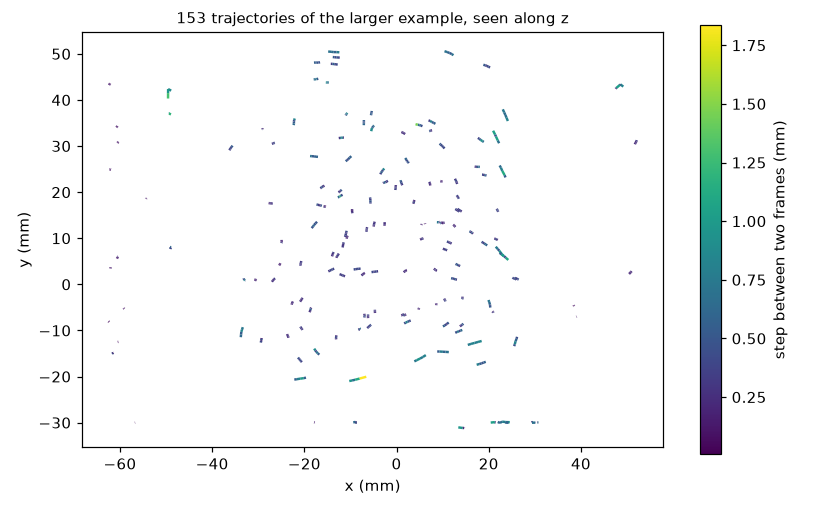
153 trajectories of 5 frames each. The colour is the step between two frames.
Do it
python -c "
import numpy as np
from openptv2.storage.run_store import RunStore

store = RunStore('big_run/res/run.zarr', mode='r')
tr = store.trajectories()
speeds, noise = [], []
for i in np.unique(tr['trajid']):
    m = tr['trajid'] == i
    order = np.argsort(tr['time'][m])
    t = tr['time'][m][order].astype(float)
    p = 1000 * tr['pos'][m][order]                       # metres to mm
    if len(t) < 4:
        continue
    coef = np.polyfit(t - t.mean(), p, 2)                # one quadratic per coordinate
    fit = np.stack([np.polyval(coef[:, k], t - t.mean()) for k in range(3)], axis=1)
    noise.append(np.sqrt(np.mean(np.sum((p - fit) ** 2, axis=1))))
    speeds.append(np.linalg.norm(coef[1]))               # speed at the middle frame, mm per frame
print('trajectories with 4 or more frames:', len(speeds))
print(f'median speed {np.median(speeds):.2f} mm/frame')
print(f'median distance of the points from the fitted curve {np.median(noise):.2f} mm')
"
What you should see
trajectories with 4 or more frames: 153
median speed 0.34 mm/frame
median distance of the points from the fitted curve 0.06 mm
Check that it worked
- Speed in physical units: multiply by your frame rate. For example 0.34 mm per frame at 100 frames per second is 34 mm per second. The example data come without a stated frame rate, so we leave it in "per frame".
- Fit distance: the median distance of the points from the curve is a rough measure of the position noise. A track that needs much more than the typical value is suspect. With 5 points and 3 fit numbers per coordinate, this value is lower than the true noise. Use longer tracks to measure noise properly.
- Speed against noise: here the step per frame (0.34 mm) is only a few times bigger than the noise. The velocity of one short track is therefore rough. Averages over many tracks are better than single tracks.
Where to go from here
- Longer runs: process all your frames, not five. Tracks of 20 or more frames allow better fits.
- Settings for your flow: Tracking parameters and Tracker engines.
- Statistics of the flow (Lagrangian and Eulerian): Lagrangian turbulence quality.
- Look at the tracks in 3D: in the window, Tracking → Visualize 3D trajectories, or Tracking → Save Paraview files.
- Your own experiment: the recipes.
If it did not work
| You see | Cause | What to do |
|---|---|---|
Sealed is missing and there are no trajectories |
tracking did not run | run openptv2-batch ... --mode tracking |
| speeds 1000 times too big or small | mixed up metres and millimetres | positions of trajectories are in metres (see the table) |
vel is all zeros |
the tracker does not store velocities | compute them as above |
Back to the start{ .md-button }